
Built-in Tools
All agents in Selu have access to a set of built-in tools provided by the orchestrator. These tools handle common tasks like delegation, event emission, persistent storage, long-term memory, and scheduling.
Unlike capability tools, built-in tools are handled directly by the orchestrator and don’t require separate containers. They follow the same permission system as capability tools and can be set to Allow, Ask, or Block policies.
Delegation Tools
Section titled “Delegation Tools”delegate_to_agent
Section titled “delegate_to_agent”Hand off tasks to other specialist agents in your Selu instance.
{ "name": "delegate_to_agent", "description": "Delegate a task to another specialist agent", "parameters": { "type": "object", "properties": { "agent_id": { "type": "string", "description": "ID of the target agent to delegate to" }, "message": { "type": "string", "description": "The task or question to delegate" } }, "required": ["agent_id", "message"] }}The orchestrator maintains an agent registry that shows available agents to the current agent. Only agents with routing: delegate appear in the registry — agents with routing: inline have their tools directly accessible without delegation.
Event Tools
Section titled “Event Tools”emit_event
Section titled “emit_event”Emit events that can trigger subscriptions or other agent reactions.
{ "name": "emit_event", "description": "Emit an event to trigger subscriptions or notify other systems", "parameters": { "type": "object", "properties": { "event_type": { "type": "string", "description": "Type of event being emitted" }, "payload": { "type": "object", "description": "Event data payload" } }, "required": ["event_type", "payload"] }}Events are stored in the database and can be consumed by event subscriptions with CEL filter expressions.
Storage Tools
Section titled “Storage Tools”Agents can persistently store key-value data that survives container restarts and agent updates.
store_set
Section titled “store_set”Store a key-value pair persistently.
{ "name": "store_set", "description": "Persistently store a key-value pair", "parameters": { "type": "object", "properties": { "key": { "type": "string", "description": "Storage key" }, "value": { "type": "string", "description": "Value to store" } }, "required": ["key", "value"] }}store_get
Section titled “store_get”Retrieve a stored value by key.
{ "name": "store_get", "description": "Retrieve a stored value by key", "parameters": { "type": "object", "properties": { "key": { "type": "string", "description": "Storage key to retrieve" } }, "required": ["key"] }}store_delete
Section titled “store_delete”Delete a stored key-value pair.
{ "name": "store_delete", "description": "Delete a stored key-value pair", "parameters": { "type": "object", "properties": { "key": { "type": "string", "description": "Storage key to delete" } }, "required": ["key"] }}store_list
Section titled “store_list”List all stored key-value pairs for this agent and user.
{ "name": "store_list", "description": "List all stored key-value pairs", "parameters": { "type": "object", "properties": {}, "required": [] }}Storage is scoped per agent and per user — each user’s data is completely isolated.
Memory Tools
Section titled “Memory Tools”Agents can save and retrieve long-term contextual notes using BM25-indexed search. This is different from storage (key-value data) and personality facts (user attributes) — memory is for contextual information that helps with ongoing work.
memory_remember
Section titled “memory_remember”Save a contextual note that may help with future interactions.
{ "name": "memory_remember", "description": "Save a contextual note for future reference", "parameters": { "type": "object", "properties": { "memory": { "type": "string", "description": "The information to remember" }, "tags": { "type": "string", "description": "Optional comma-separated tags for organization" } }, "required": ["memory"] }}Use this for:
- Project context and requirements
- User workflow preferences
- Important facts discovered during conversations
- Task-related information that spans multiple sessions
memory_forget
Section titled “memory_forget”Delete a previously stored memory by ID.
{ "name": "memory_forget", "description": "Delete a stored memory by its ID", "parameters": { "type": "object", "properties": { "memory_id": { "type": "string", "description": "ID of the memory to delete" } }, "required": ["memory_id"] }}memory_search
Section titled “memory_search”Search stored memories using keyword relevance.
{ "name": "memory_search", "description": "Search stored memories using BM25 keyword matching", "parameters": { "type": "object", "properties": { "query": { "type": "string", "description": "Search query" }, "limit": { "type": "integer", "description": "Maximum results to return (1-10)", "minimum": 1, "maximum": 10 } }, "required": ["query"] }}memory_list
Section titled “memory_list”List recently stored memories.
{ "name": "memory_list", "description": "List recently stored memories", "parameters": { "type": "object", "properties": { "limit": { "type": "integer", "description": "Maximum results to return (1-50)", "minimum": 1, "maximum": 50 } }, "required": [] }}Automatic Memory Retrieval
Section titled “Automatic Memory Retrieval”In addition to manual search, the orchestrator automatically injects relevant memories into each turn’s context. It uses BM25 search based on the user’s latest message to find the most relevant stored memories and includes them in the system context.
This means agents benefit from stored memories even without explicitly calling memory_search.
Scheduling Tools
Section titled “Scheduling Tools”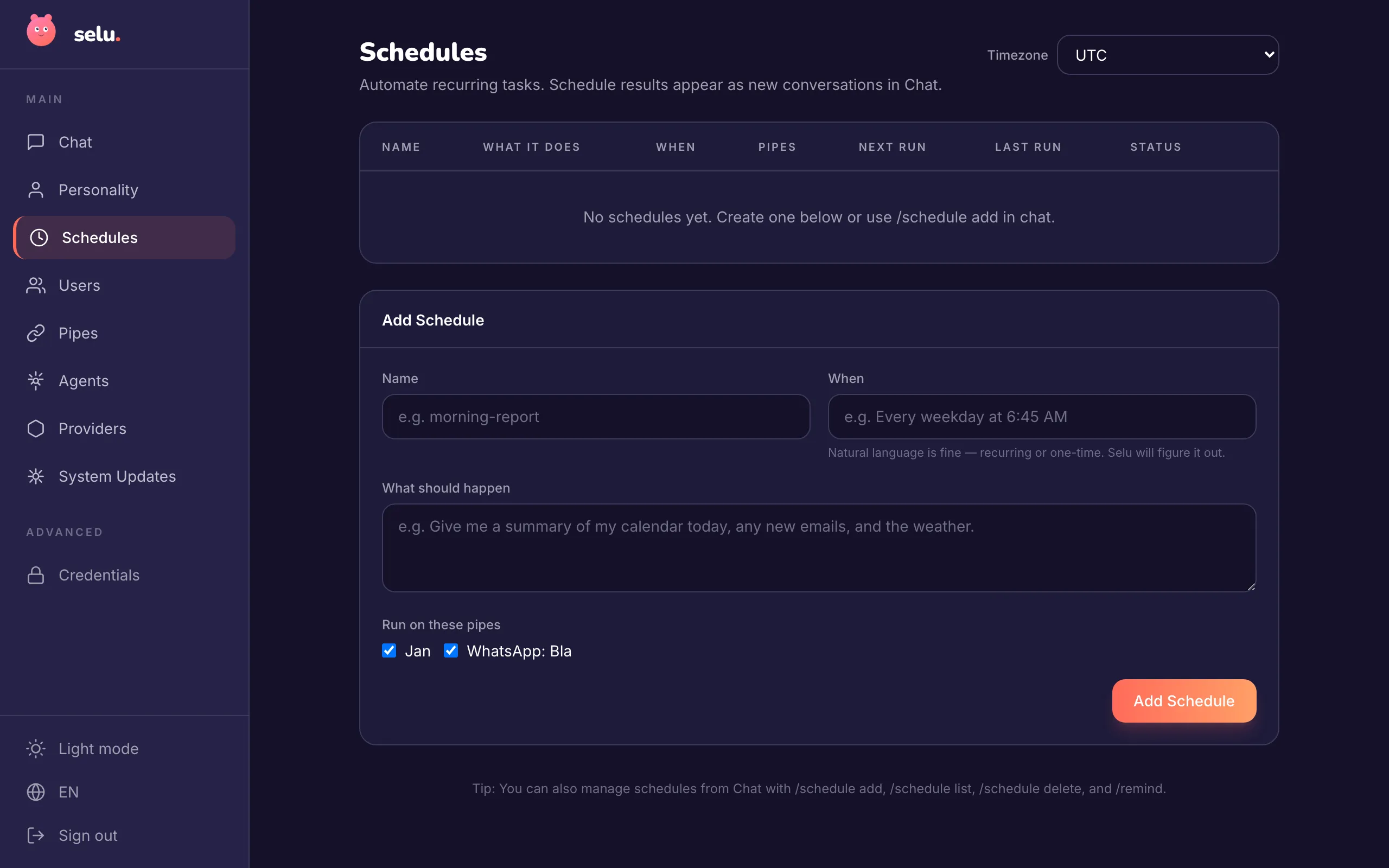
Agents can create both one-time reminders and recurring schedules on behalf of users.
set_reminder
Section titled “set_reminder”Schedule a one-time future action.
{ "name": "set_reminder", "description": "Set a one-time reminder for a future action", "parameters": { "type": "object", "properties": { "name": { "type": "string", "description": "Name/identifier for this reminder" }, "prompt": { "type": "string", "description": "What the agent should do when the reminder fires" }, "fire_at": { "type": "string", "description": "When to fire the reminder (ISO datetime or relative)" }, "timezone": { "type": "string", "description": "Optional timezone override" } }, "required": ["name", "prompt", "fire_at"] }}The fire_at parameter accepts:
- ISO datetime strings with timezone:
2024-03-15T14:30:00Z - Local datetime (interpreted in user’s timezone):
2024-03-15T14:30:00 - Relative expressions:
in 30 minutes,tomorrow at 9am
Timezone handling:
- Times with timezone/offset (like “2026-03-08T10:00:00Z” or “2026-03-08T11:00:00+01:00”) are used exactly as specified
- Naive times without timezone (like “2026-03-08T11:00:00”) are interpreted in the user’s configured timezone, or the
timezoneparameter if provided
Important notes:
- The
fire_atmust be a future timestamp - When the reminder fires, the agent can use any of its tools to complete the task
- Fired reminders are automatically cleaned up after 7 days
set_schedule
Section titled “set_schedule”Create a recurring schedule.
{ "name": "set_schedule", "description": "Create a recurring scheduled task", "parameters": { "type": "object", "properties": { "name": { "type": "string", "description": "Name/identifier for this schedule" }, "prompt": { "type": "string", "description": "What the agent should do on each execution" }, "cron_expression": { "type": "string", "description": "Cron expression for when to run (or natural language)" }, "cron_description": { "type": "string", "description": "Human-readable description of when this schedule runs" }, "timezone": { "type": "string", "description": "Optional timezone override for cron evaluation" } }, "required": ["name", "prompt", "cron_expression", "cron_description"] }}The cron_expression can be either a standard cron expression or natural language that the system will parse:
0 6 * * 1-5(6 AM weekdays)every weekday at 6:45 AMdaily at noon
Important notes:
- Use 6-field cron format:
second minute hour day-of-month month day-of-week - Day of week: 0=Sunday, 1=Monday, …, 6=Saturday
- Example:
0 45 6 * * 1-5means “at 6:45 AM on weekdays” - When the schedule fires, the agent can use any of its tools to complete the task
Tool Approval Messages
Section titled “Tool Approval Messages”Enhanced approval prompts
Section titled “Enhanced approval prompts”When calling any tool with an “Ask” policy, agents can include an _approval_message field to provide user-friendly explanations:
{ "name": "send_email", "parameters": { "to": "client@example.com", "subject": "Project Update", "body": "...", "_approval_message": "I'd like to send a project update email to the client." }}Important notes:
- The
_approval_messagefield is internal and stripped before actual tool execution - Keep messages under 140 characters
- Write from the agent’s perspective in plain language
- This makes approval requests much more user-friendly, especially in external channels like iMessage
Localized approval messages
Section titled “Localized approval messages”In addition to _approval_message, agents can provide _approval_message_i18n as an object with locale keys. The orchestrator picks the message matching the user’s configured locale:
{ "name": "send_email", "parameters": { "to": "client@example.com", "subject": "Project Update", "body": "...", "_approval_message": "I'd like to send a project update email to the client.", "_approval_message_i18n": { "de": "Ich möchte eine Projekt-Update-E-Mail an den Kunden senden.", "en": "I'd like to send a project update email to the client." } }}When _approval_message_i18n is present and contains the user’s locale, it takes precedence over _approval_message. If the locale is not found, the orchestrator falls back to _approval_message.
Permission Management
Section titled “Permission Management”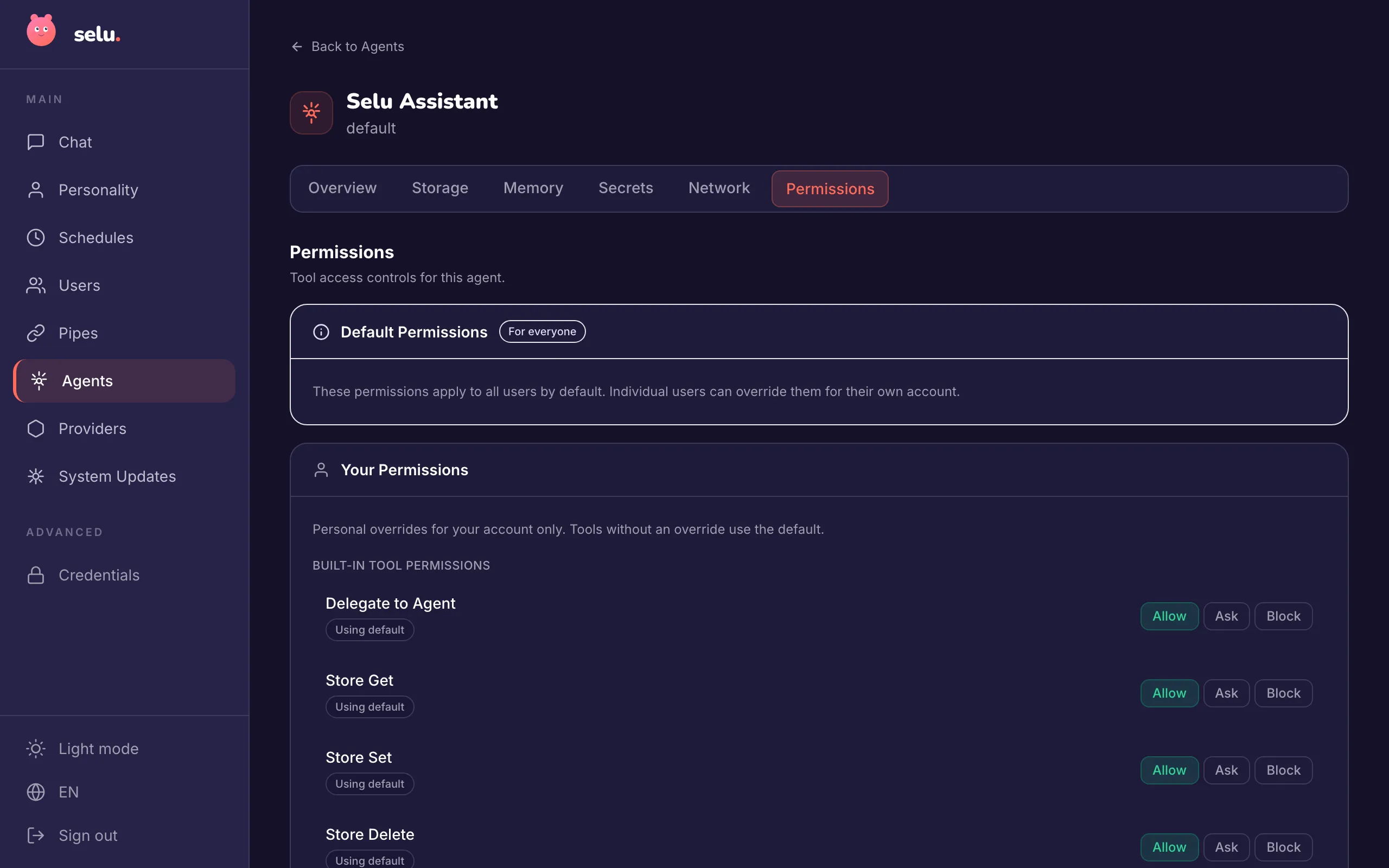
All built-in tools are subject to the same permission system as capability tools:
- Allow — Tool executes immediately without user confirmation
- Ask — User receives approval request on active channel
- Block — Tool call is denied entirely
Default Policies
Section titled “Default Policies”When agents are installed, built-in tools receive these default policies:
| Tool | Default Policy | Reasoning |
|---|---|---|
delegate_to_agent | Allow | Safe delegation between agents |
emit_event | Ask | May trigger external actions |
store_* | Allow | Personal data storage |
memory_* | Allow | Contextual note-taking |
set_reminder | Allow | Personal scheduling |
set_schedule | Allow | Personal automation |
Administrators can change global defaults, and users can create personal overrides on a per-agent basis.
Tool policies can be set globally by admins and overridden by individual users.
Usage in Agent Development
Section titled “Usage in Agent Development”When developing agents, you can instruct them to use these built-in tools in your agent.md or capability prompt.md files:
## Storage
You can remember information between conversations using the store_* tools:- Use `store_set` to save user preferences, sync checkpoints, or other persistent data- Use `store_get` to retrieve previously saved information- Use `store_list` to see all stored data- Use `store_delete` to remove outdated information
## Scheduling and Reminders
When users ask for recurring tasks or one-time reminders:- Use `set_schedule` for recurring requests (daily, weekdays, every Monday, etc.)- Use `set_reminder` for one-time future requests (tomorrow, next Sunday, in 2 hours, etc.)- Parse natural language timing into appropriate cron expressions or timestamps- Always write the prompt in the same language the user is using- Create clear prompts describing what should happen- Generate descriptive names for schedules and reminders- For reminders, prefer passing the user's local time without timezone offset so it's interpreted correctly
## Timezone Best Practices
- When creating reminders, use simple datetime formats like "2026-03-08T11:00:00" for user's local time- Only include timezone/offset when the user specifically requests a different timezone- The system will handle timezone conversion automatically based on user settings
## Tool Approval
Always include `_approval_message` in tool calls to provide friendly explanations:- Write short, plain-language descriptions of what you want to do- Use the user's perspective: "I'd like to..." rather than technical details- This helps users understand and approve tool usage, especially in external channels
Error Handling
Section titled “Error Handling”Agents receive structured error responses when:
- Required parameters are missing
- Parameter values are invalid (e.g., malformed timestamps, invalid cron expressions, past times for reminders)
- Tool policy blocks execution
- System errors occur during execution
Implementation Notes
Section titled “Implementation Notes”Thread Isolation
Section titled “Thread Isolation”Built-in tools respect agent session isolation settings. If an agent is configured with session.isolation: per_thread, storage and memory operations are isolated per conversation thread.
Data Cleanup
Section titled “Data Cleanup”When agents are uninstalled, all associated data is automatically cleaned up:
- Storage entries are deleted
- Memory entries are removed
- Scheduled reminders and recurring tasks are cancelled
Security
Section titled “Security”- All storage and memory operations are scoped by agent ID and user ID
- No cross-user data access is possible
- No cross-agent data access is possible
- Scheduling operations create entries owned by the requesting user
- Event emissions are logged with source attribution
This ensures complete data isolation and prevents agents from accessing data they shouldn’t see.