
Amazon Bedrock
Amazon Bedrock gives you access to foundation models from Anthropic, Meta, Mistral, and others — all billed through your AWS account. If you’re already using AWS, Bedrock is a natural fit.
Prerequisites
Section titled “Prerequisites”Before connecting Selu to Bedrock, you’ll need:
- An AWS account — Sign up at aws.amazon.com if you don’t have one.
- Bedrock model access — Enable the models you want in the AWS console under Amazon Bedrock → Model access. Some models require a brief approval process.
- A bearer token — You’ll need an AWS access token (bearer token) for authentication. This is typically obtained through your AWS session or API gateway.
Connecting to Selu
Section titled “Connecting to Selu”- In the Selu sidebar, click Providers.
- Click Add Provider and select Amazon Bedrock.
- Paste your bearer token into the AWS Access Token field.
- Enter your AWS Region (e.g.,
us-east-1). Choose the region where you enabled model access. - Click Check & Save. Selu will verify the connection and save your settings.
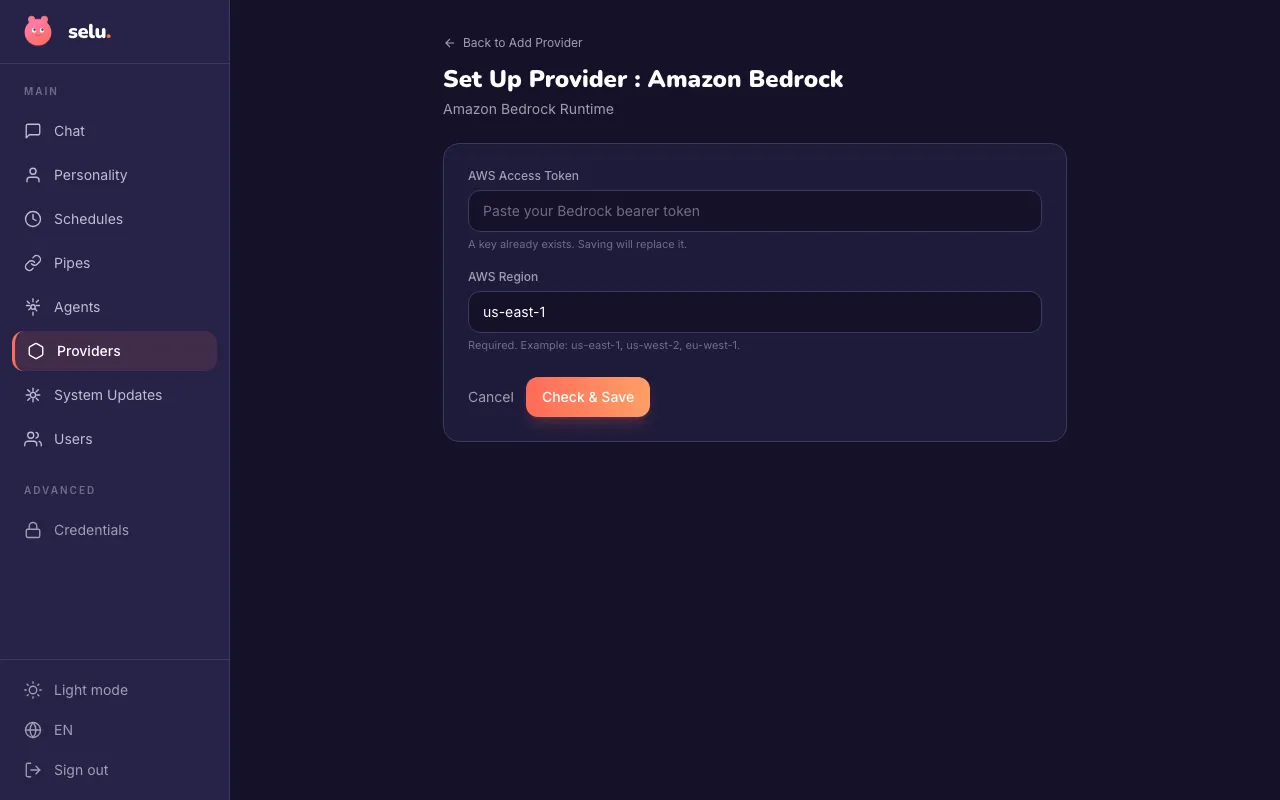
Your access token is encrypted at rest.
Choosing a model
Section titled “Choosing a model”Bedrock offers models from multiple providers. The model is selected per agent under Agents → (agent name) → Model. Selu automatically fetches available models from your Bedrock account.
Popular choices include:
| Model | Provider | Good for |
|---|---|---|
| Claude Sonnet 4 | Anthropic | General purpose, balanced speed and quality |
| Claude Fable 5.1 | Anthropic | Advanced reasoning and demanding multi-step tasks |
| Claude 3.5 Haiku | Anthropic | Fast, affordable responses |
| GPT-5.6 Sol | OpenAI | Complex reasoning via Bedrock inference profiles |
| Llama 3 | Meta | Open-weight alternative, good all-rounder |
| Mistral Large | Mistral | Strong at coding and reasoning |
Image handling
Section titled “Image handling”Bedrock has a 5 MB limit per image for multimodal requests. Selu handles this automatically:
- If you attach an image that’s too large, Selu will downscale and recompress it to fit within the limit before sending it to Bedrock.
- If the image can’t be reduced enough to fit, it’s omitted and the agent receives a note explaining why, so the conversation can still continue.
You don’t need to resize images yourself before sending them — Selu takes care of it. However, sending smaller images will give the model a higher-quality view of what you’re sharing.
Stream error handling
Section titled “Stream error handling”Selu automatically recovers from streaming errors on Bedrock. If a stream is interrupted or the model returns an error mid-response, Selu falls back to a non-streaming request so the conversation can still complete. If Bedrock returns an empty response, the turn is marked as failed rather than showing a blank message — so you’ll always know something went wrong.
Troubleshooting
Section titled “Troubleshooting”- “Access denied” — Ensure your token has the correct Bedrock permissions and that the model is enabled in your selected region.
- “Model not found” — Go to Amazon Bedrock → Model access in the AWS console and request access to the model.
- High latency — Choose a region geographically close to your Selu server. Also consider using a faster model like Haiku.
- Image not visible to the agent — If the agent mentions it can’t see an image you attached, the original file may have been too large to compress below the 5 MB limit. Try uploading a smaller version.
- Blank or missing responses — If a turn shows a failure state, this likely means Bedrock returned an empty response. Retry the message or check your model access in the AWS console.